Introducing tapes: transparent AI agent telemetry
Last week, we released tapes,
a new open source agentic telemetry tool for understanding the “what”, “why”, and “how”
of your AI agents.
One of the biggest problems I’ve noticed with the current age of AI agent tools is that they’re all “opaque” and once you’re done with a session, typically all of that context is lost: all of the learned lessons, all of the decisions, all of the errors, and all of the successes. This is a wealth of information that you (the operator) and the agent (the executor) could utilize or leverage in the future but is instead lost to the ether of context.
This only gets worse when you take a step back and witness the security landscape of AI agents: it’s all “spray and pray” hoping for the best: OpenClaw can have unfettered access to your computer, and you’re encouraged to let it utilize arbitrary skills off the internet with zero audit trail.
We need a better way to audit, understand, and monitor our agents.
This is why we built tapes: a durable, auditable record of every agent session.
Like magnetic tapes, the most resilient data storage medium ever created,
tapes ensures that nothing your agents do is ever lost.
Using tapes
We built tapes to be local first and it works great with the major inference API providers
like OpenAI and Anthropic. For this demo, let’s utilize Ollama locally.
Start the Ollama server so that we can get inference throughout the demo:
❯ ollama serveWe’ll also need 2 models: embeddinggemma and gemma3.
Make sure you have those downloaded with ollama pull.
tapes is essentially 4 pieces:
- A proxy service that sits between your AI agent (like Claude Code or OpenClaw)
and the inference provider API (like
api.openai.comor Ollama’slocalhost:11434/v1/chat). This is where sessions and telemetry are captured, persisted, and embedded. - An API server for interfacing with and querying the system.
- A CLI client that you can use to manage and run the system: this is how you’ll get things going, see telemetry data, search, and manage the system.
- A Terminal User Interface (TUI) for deeper analysis and understanding of your agents.
Let’s start the tapes services:
❯ tapes serveBy default, this starts the proxy on :8080, the API on :8081,
targets Ollama as the proxy upstream, uses a SQLite database for
session and vector storage, and uses Ollama for embeddings.
There are lots of ways to configure and bootstrap tapes.
So if at any point you want to see the breadth and depth of configuration options,
just use --help!
After starting the services, a local ./data.db will be created: this is the
SQLite database of sessions and embeddings.
Next, let’s launch a chat session with tapes (useful for seeing the system
work end to end!)
❯ tapes chatStarting new conversation (no checkout)
Type your message and press Enter. Type /exit or Ctrl+D to quit.
you> Hello world!This is an admittedly bare-bones interface, but it gives you an easy glimpse into how tapes works
as it automatically targets the running proxy on :8080 and utilizes an Ollama client.
Search and content addressing
After chatting with the model for a bit, we can search previous sessions.
Utilizing vector search, we can find the most relevant content based on the semantic
meaning and the embeddings from the embeddinggemma model:
❯ tapes search "Where is new york?"Search Results for: "Where is new york?"
============================================================
[1] Score: 0.9028
Hash: 51b2ee82265555ab081775696f2d6036a8e5d0b6ce40e03a0bea0e0a8eee08ec
Role: user
Preview: Where is New York?
Session (2 turns):
>>> [user] Where is New York? - 51b2ee82265555ab081775696f2d6036a8e5d0b6ce40e03a0bea0e0a8eee08ec
|-- [assistant] Okay, let's break down where New York is! New York is a state located in the **northeastern United States**. Here's a more detailed breakdown: .....The most relevant result is the session I just had where I asked the agent about New York
(again, arbitrary UI, but we see the most relevant data with the >>> identifier)!
You’ll also notice something interesting here: a hash for the message Where is New York?.
This is a content addressable hash that maps directly to the model, the content, and
the previous hash in the conversation. This is very similar to how git works, where each commit has its own hash.
Agentic conversation turns and sequences aren’t too dissimilar from git commits and branches
in this way - they’re statically addressable and targetable based on the hash sum
of their content. This also means you can do things like branching conversations,
point-in-conversation retries, and conversation-turn forking.
Let’s look at context check-pointing and retries with tapes.
Let’s checkout the hash from the previous search results:
❯ tapes checkout 51b2ee82265555ab081775696f2d6036a8e5d0b6ce40e03a0bea0e0a8eee08ecChecked out 51b2ee82265555ab... (1 messages)
[user] Where is New York?This populates a ~/.tapes/checkout.json for the global state (if you want per-project checkouts,
just run tapes init in your project directory - this will create a local ./.tapes/ dir).
Now, when we start a tapes chat session, we’ll begin with the context from the
context-checkpoint where we did a checkout:
❯ tapes chatResuming from checkout 51b2ee82265555ab... (1 messages)
Type your message and press Enter. Type /exit or Ctrl+D to quit.
you> What was my last message?
assistant> Okay, let’s tackle those questions:
**Where is New York?**This is extremely useful for retrying and going back to certain points in a conversation
or AI workflow. This also opens the door to more advanced workflows like
pre-peppering AI agent context or launching swarms of conversation-forks
and gathering the results via tapes analysis.
TUI operations
We recently brought in a terminal user interface (TUI) in order to more expressively
explore your sessions and telemetry with tapes:
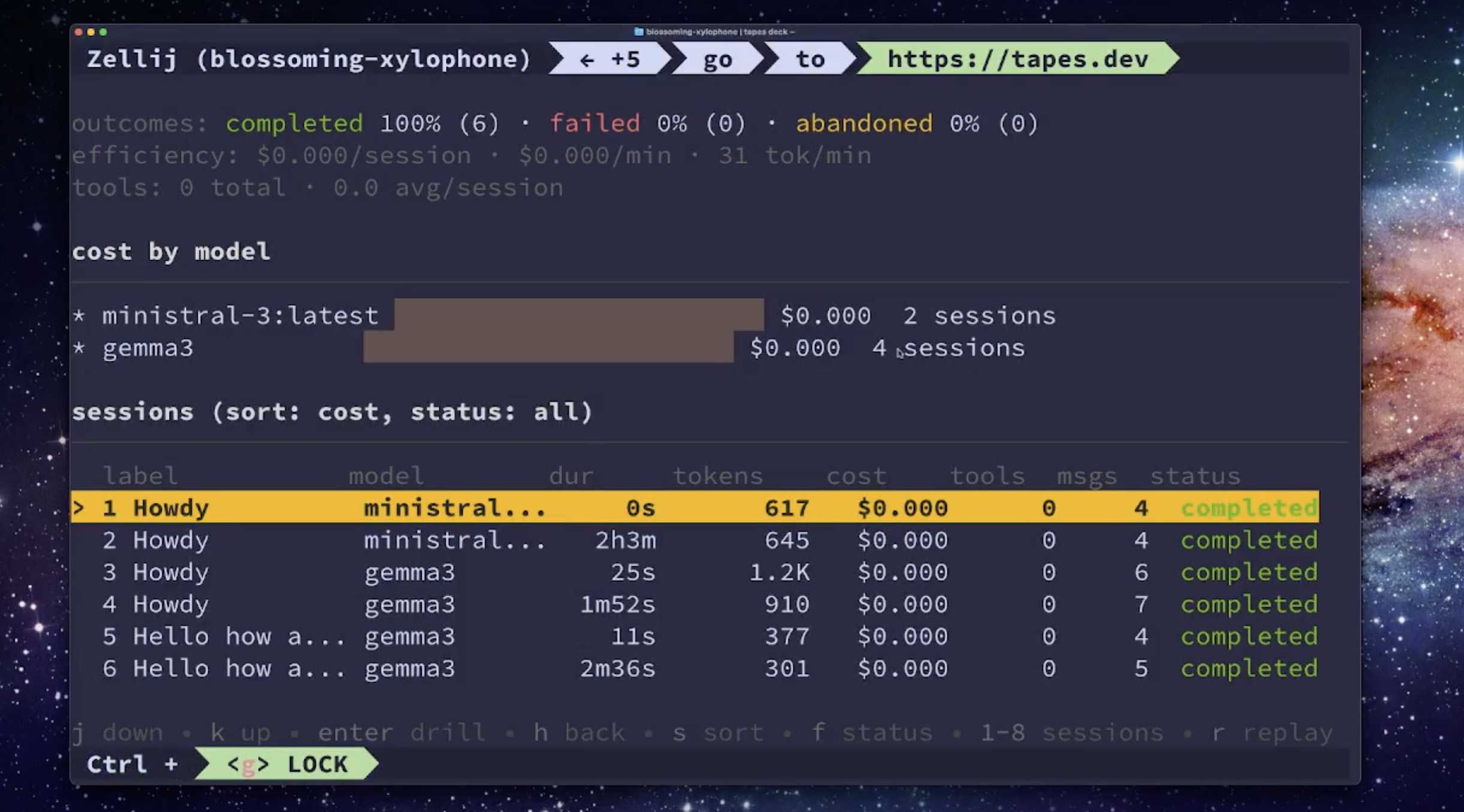
tapes deckThis brings up the TUI so you can start seeing your session data in real time.
The TUI also helps surface some interesting metrics like cost per session efficiency,
outcomes over sessions (completed, failed, abandoned)
and breakdowns by model.
Looking to the future
We’re really excited to keep making tapes as excellent as possible. Some features that we’ll be bringing in soon:
- Support for https://agent-trace.dev to allow for coding agent tools to surface what code they’ve touched and where.
- Further support for more LLM providers like AWS Bedrock and Google Vertex.
- More storage and vector providers like Postgres, Pgvector, and Qdrant.
Be sure to check out the repo, give us a star, and let us know your feedback!!!